
MeetETA for Chrome: convert time zones where you read them
Someone writes "3 PM EST Thursday" and you are in another time zone? Select the text and MeetETA shows that moment in your own time, right next to it. Free, no account needed, and it works entirely on your device.
Version 1.0.1. Works in Chrome, Edge, Brave and other Chromium browsers on desktop.
What it does
Select a time on any page
Highlight "3 PM EST", "15:00 GMT" or "10am PT Thursday" on any website, Gmail included, and a small card shows it in your time zone.
Right-click to convert
Select text, right-click and choose Convert with MeetETA.
Convert to another city
Write "1530 uk to est" or "9am London -> Tokyo" and the card shows the time there, with your own time on the next line.
Daylight saving warnings
If someone writes "EST" while New York is on EDT, the card tells you, so you join at the right hour.
Copy or share
Copy the converted time, or copy a MeetETA share link that shows the time in each viewer’s own zone.
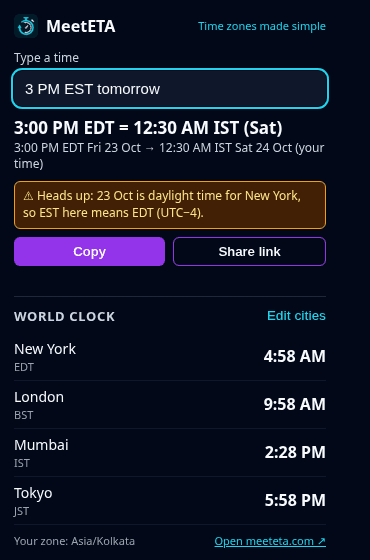
Toolbar popup
Type any time to convert it, and keep a world clock of up to 4 cities, saved with Chrome sync.
How it works
- Add MeetETA to Chrome from the Chrome Web Store.
- Select a time on any page, or right-click it and choose Convert with MeetETA.
- Read the time in your zone, then copy it or share a link.
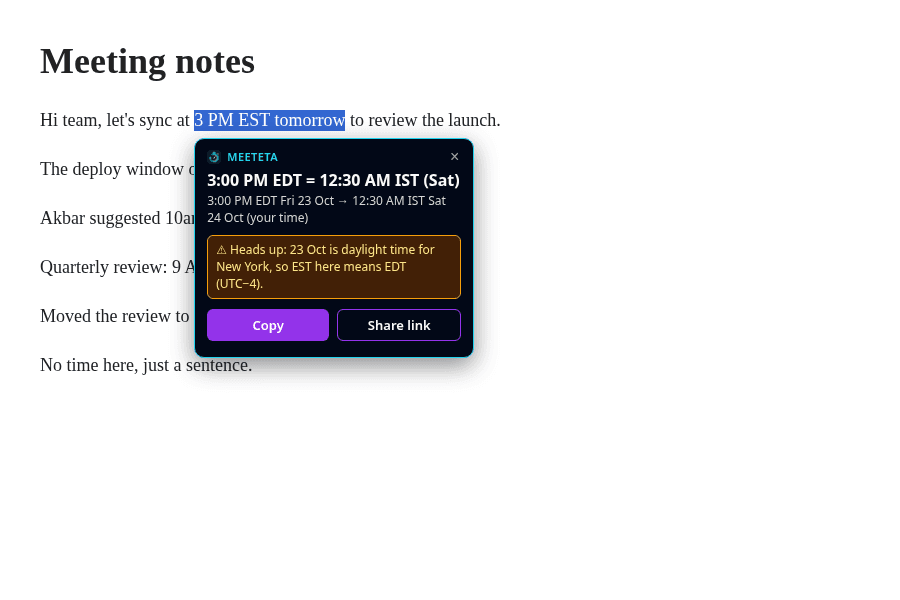
The extension reads times the same way as the MeetETA converter, so a time you check in Chrome matches meeteta.com.
Questions
- Is the MeetETA Chrome extension free?
- Yes. The extension is free to install and use.
- Do I need a MeetETA account?
- No. The extension has no sign-in. It works as soon as you install it.
- What data does it collect?
- None. It converts the text you select on your device and forgets it. It runs no analytics and makes no network requests.
- Why does it ask for these permissions?
- It can read pages so the card appears when you select a time. "contextMenus" adds the right-click entry, "storage" saves your world clock cities, and "activeTab" lets the right-click action reach the tab you are using.
- Which browsers does it work in?
- Chrome on desktop, and other Chromium browsers that install from the Chrome Web Store, such as Edge and Brave. Chrome does not allow extensions on chrome:// pages or the Chrome Web Store itself.
More detail is in our privacy policy.